

Steve Jones asks how we parse strings.
As Steve writes, there are a bunch of ways to parse strings in SQL. And (which Steve doesn’t write) 2025 is going to change a lot of people’s approaches, with its native regular expression functions. I’ve looked at these, but so far my reaction is more like “Oh finally!”, rather than “Ooh, think of the potential!” – I think these new functions are most useful for when you’ve got a regular expression that you’re using in non-SQL code, and now it’s much easier to handle it within SQL.
I should also point out that the days of new features appearing only-when-a-new-SQL-Server-version-appears feel like they’re well-and-truly over, since Azure SQL gets stuff first. So when I write “2025”, I really mean the year, rather than the version of SQL Server. The feature-set, rather than the product.
But let’s talk about non-regex methods for parsing strings and the patterns that I use. I find that the biggest issue with most string parsing is complexity. Even something as simple as finding the value between the 2nd and 3rd hyphens can be done in different ways with different levels of complexity, and even if it works, maintaining that code can become really hard.
For example, finding the position of the first hyphen might be as simple as using the CHARINDEX function. Finding the second might involve two CHARINDEX functions, and calling SUBSTRING with parameters that have increasingly nested CHARINDEX calls… well, you can see how the complexity quickly builds
Another way to find that ‘between two hyphens’ thing would be to do a STRING_SPLIT call with the enable_ordinal parameter set, and then filter it to the third entry. All well and good, but depending on what else is needed, STRING_SPLIT’s creation of additional rows can make life harder, and if you’re fighting complexity, expanding the number of rows in a dataset and then combining them again can be hard.
As much as we data people like ‘set-based’ solutions, rather than thinking how to transform individual values, string parsing seems to fall into the bracket of okay to deal with this way.
So if we start with a string value in a variable, there are a lot of things that can be done without freaking out the person who will need to read your code later (or “future you” even). It probably doesn’t matter too much if you split the string up in various ways, concatenate parts back together in different orders, STRING_AGG some stuff, and so on. It’s certainly much easier than trying to parse all the values in a table at once in these more complex ways.
I like to separate logic for this kind of thing away into a function, where the logic can be tested and proven and anyone using it can have confidence that it works. And if there’s a bug or an enhancement, it can be fixed in one place.
But not a scalar function, of course. A table-valued function. One that can take a string as a parameter and produce a row with all the different things that could be wanted. And I can guarantee that it will produce a single row.
Now, this table-valued function should be inline, rather than multi-statement. I hope you’re asking why. It’s because I want the Query Optimizer to simplify it all out. I can call the function with APPLY in my FROM clause and then refer to whichever columns I like, and expect the QO not to bother with working out the ones I don’t want. So if I have a function that carves up an address string into various components, does some lookups to get reference values, maybe coming up with a JSON version and an XML version, and so on… if I don’t reference the JSON column in my outer query, my function won’t bother to produce it. A multi-statement will do all the work every time because it’s procedural. Inline will leverage the Query Optimizer to figure out which things it doesn’t need.
APPLY won’t just get used to call the function, but I’ll use it extensively inside the function too. By using APPLY, I can do a bunch of working calculations, making the building blocks of my work, and then combine them in the different ways, while keeping the whole thing as a single query for my inline function. Remember that an inline TVF is a stored correlated subquery. With APPLY, I can layer my logic, making it easier to maintain. If I need to expand to multiple rows, I can fold it back into one in a single APPLY subquery, unpivotting or string_split and then pivotting back into a single row. If I need a new set of return columns added, some more APPLY clauses can keep that new logic separate, so that I can confidently know that I still have only one row of data coming out, and this new logic isn’t going to confuse any of my existing code.
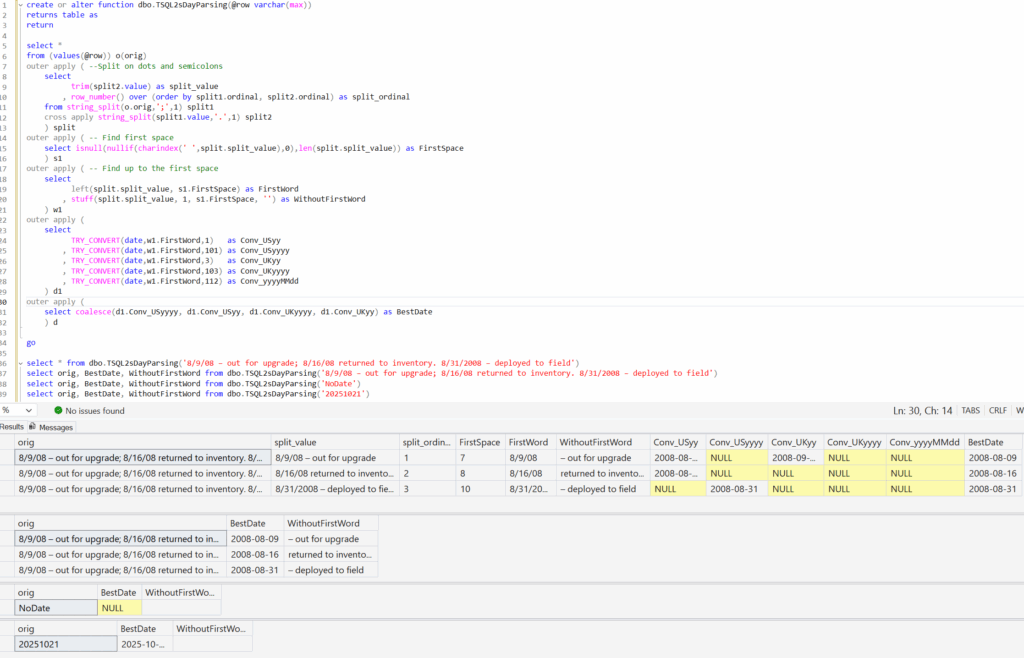
Here’s an example, using one of the ideas that Steve mentioned – pulling dates out of a string, where there are separators that are either a semicolon or full-stop. Notice that my TVF is a series of APPLY statements. Notice also that I’m using OUTER APPLY and TRY_CONVERT so that if I get NULLs, I’m still returning the row. And all the way along, I have my working calculation columns available in case I need them again.
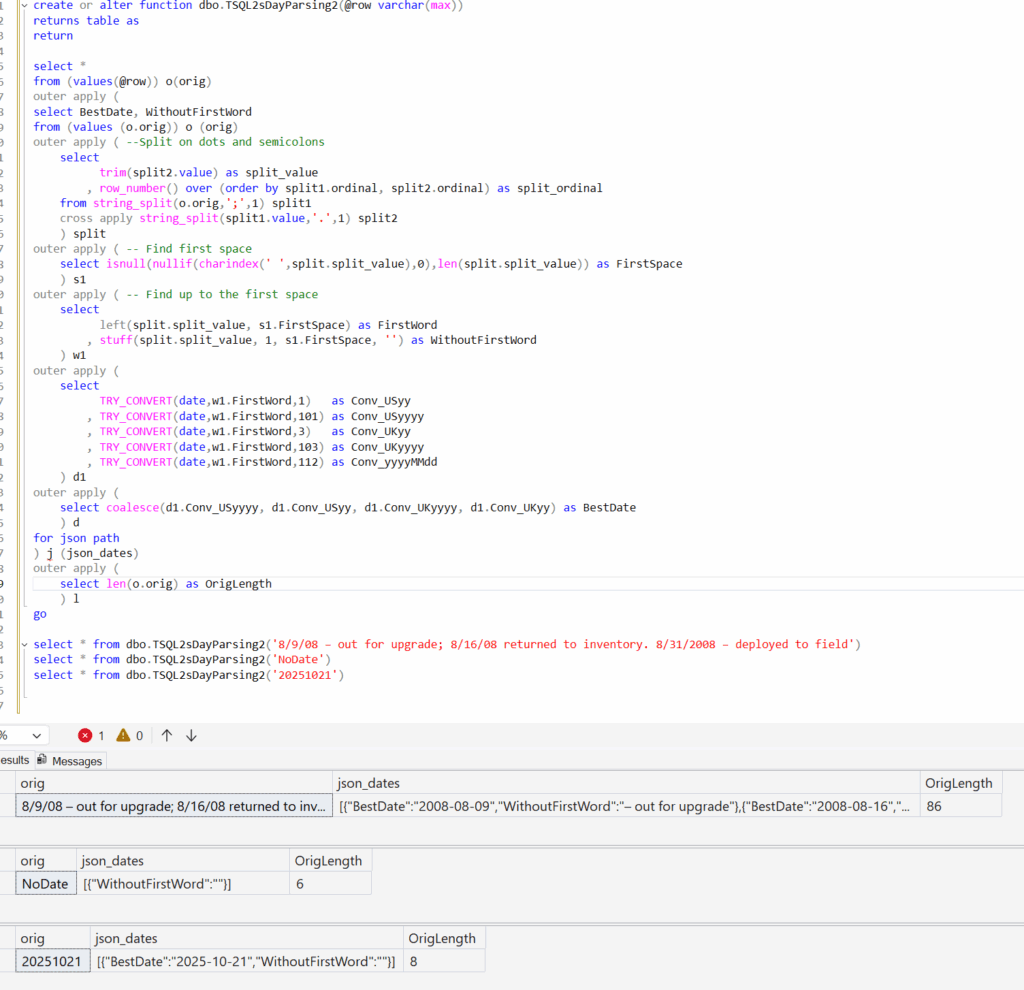
If I needed to make sure I only returned a single row per starter row, I could do that by just combining more into a single APPLY and then aggregating the results. I’ve also added a column to return the string length, which I’ll use in a moment.
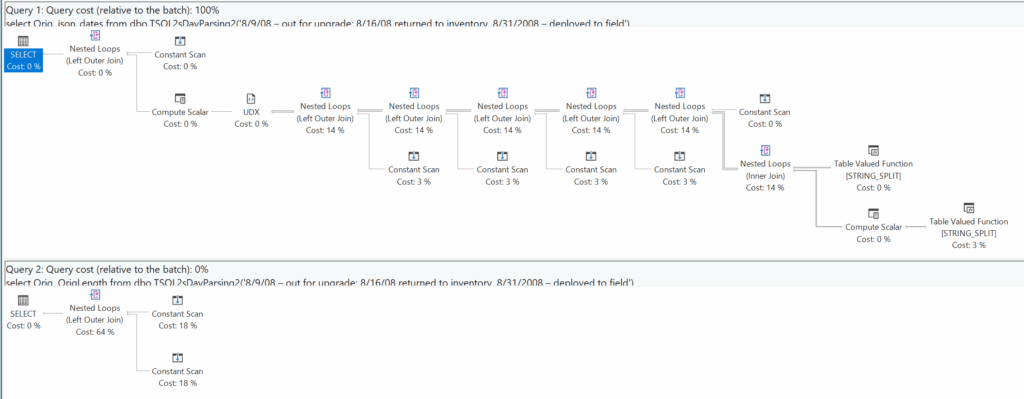
As for what happens when I ignore one of the values… well like I said earlier, the work gets cut back. Compare what happens if I’m not interested in the JSON block, only the string length.
Naturally, this can work against a table of values just fine – I’m sure I don’t need to show you what’s going on there.
Don’t misunderstand me – I love the new regex stuff that’s come in this year. But my general pattern for string parsing is unlikely to change – the regex will just be another tool in my arsenal. I’ll still create useful inline TVFs that suit my customers’ individuals need, letting them pick and choose the columns they want.
@robfarley.com@bluesky (previously @rob_farley@twitter)

This Post Has 2 Comments
in your example you could have used CROSS APPLY (similar to INNER JOIN) instead of OUTER APPLY (= LEFT JOIN), since the simple calculations done, will always produce a single return line
Yes – without a FROM or WHERE, a scalar subquery can be CROSS APPLY instead of OUTER APPLY. But I mention OUTER because sometimes (just not in this example) I might have a table of numbers involved, and maybe have zero rows in some cases.